
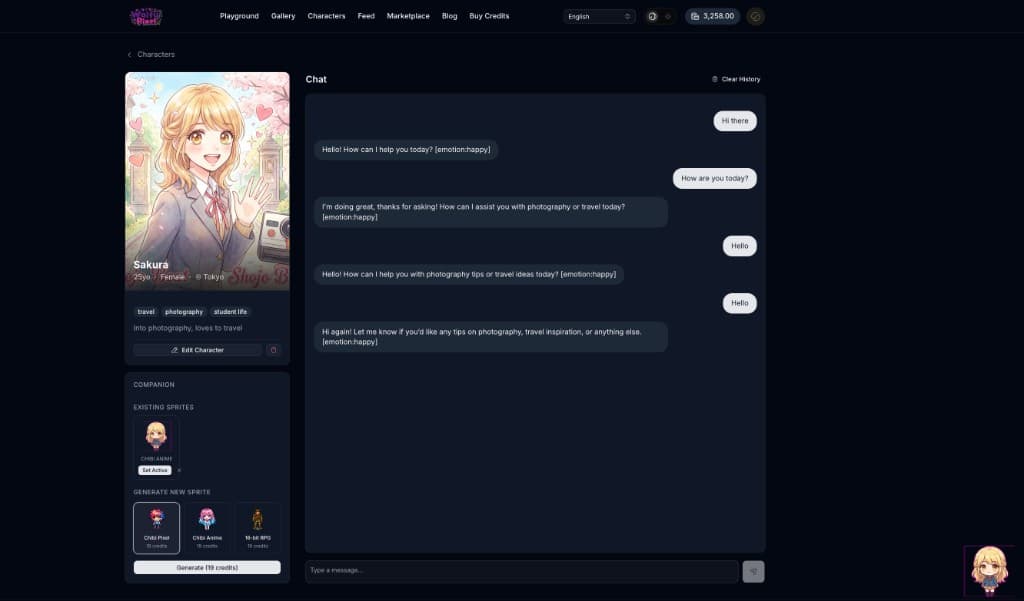
Imagine a tiny pixel companion sitting in the corner of your screen — one you designed, with a personality you wrote, that wanders around, falls asleep when you're away, and wakes up when you come back. That's what we built.
Characters & 3D Companions is our biggest feature update since launch. Design your own AI characters with distinct personalities, chat with them using leading AI models, and watch them come to life as animated pixel companions that follow you across WaifuPixel.
Create Your Own Characters
Build characters from scratch with full creative control:
- Name, age, and identity — give your character a name, age (18+), sex, and home city/country
- Personality — write a detailed description that shapes how your character thinks, speaks, and reacts
- Character image — select any image from your gallery as the character's portrait
- Greeting message — set a custom first message your character sends when a conversation starts
- Tags — add tags for discoverability (e.g., "cheerful", "tsundere", "fantasy")
- Public or private — share your character with the community or keep them just for you
- Live preview — see exactly how your character card looks as you build it
Once created, you can edit any detail at any time.
Chat Powered by Leading AI Models
Every character is backed by a real AI model of your choice. During creation, pick from providers like:
- OpenAI — GPT-4o, GPT-4o Mini
- Anthropic — Claude 3.5 Sonnet, Claude 3.5 Haiku
- Google — Gemini 2.0 Flash
Your character's personality description drives how the AI responds, so it stays in character throughout the conversation. Chat history is saved automatically — pick up right where you left off, or clear it whenever you want a fresh start.
3D Companion Sprites
This is where things get fun. After creating a character, you can generate an animated pixel sprite and set it as your companion. Your companion lives in the corner of your screen and follows you across the entire site.
Sprite Styles
Choose from multiple art styles when generating your companion:
- Chibi Pixel — cute pixel art in a chibi style
- Chibi Anime — anime-styled chibi characters
- 16-bit Pixel — retro-inspired 16-bit sprites
Each style produces a full sprite sheet with 7 animations — idle, walking, happy, waving, sleeping, talking, and poke — so your companion feels alive no matter what's happening.
Personality-Driven Behavior
Your companion doesn't just sit there — it behaves according to your character's personality. The system reads your character's tags and description to adjust behavior:
- Energetic or playful characters wander more frequently and emote more often
- Shy or introverted characters stay calmer with fewer spontaneous reactions
- Sleepy or lazy characters doze off faster when you're idle
- Tsundere characters have reduced emote frequency
The companion also tracks your activity. If you step away from the keyboard, it eventually falls asleep. When you come back, it wakes up.
Interactive Features
Your companion responds to direct interaction:
- Click to open a mini chat bubble and talk to your character
- Double-click to poke them and trigger a reaction
- Drag to move them anywhere on screen — they snap to the nearest edge when released
- Right-click to open companion settings (size, position)
The chat bubble shows your last 5 messages and lets you have quick conversations without leaving the page you're on.
Smooth Performance
Companion animations run on a GPU-accelerated rendering engine, so movement stays smooth at 60fps without slowing down your browsing.
Discover Characters from the Community
The Discover page lets you browse all public characters created by the community. Characters are sorted by popularity (chat count), so the most engaging characters rise to the top.
Each character card shows:
- Character image and name
- Age and location
- Personality tags
- Greeting message preview
- Chat count
Find a character you like? Click to start chatting immediately.
3D Character Showcase
When viewing a character's profile, you'll see a Three.js-powered 3D display that presents your character in a glassmorphic showcase with:
- An illuminated pedestal base
- Floating particle effects
- Professional studio lighting
- Smooth auto-rotation (respects reduced motion preferences)
- Full orbit controls to view from any angle
It makes every character feel like a collectible on display.
Getting Started
- Create a character — Head to Characters and click "Create Character"
- Design their personality — Fill in their details, write their personality, and pick an AI model
- Generate a companion sprite — After creation, choose a sprite style and generate your animated companion
- Set as companion — Your character will follow you across WaifuPixel
- Share with the community — Make your character public so others can chat with them too
What's Next
This is just the beginning for Characters & Companions. We're working on VRM 3D model support for full 3D character companions, more sprite styles, voice chat, and deeper personality systems. Stay tuned.
Create Your First Character and bring them to life today.
Questions or feedback? Join our Discord community — we'd love to hear what characters you create.